Onboard Your AI Agent to Your Existing Codebase
Read the code once, and get a map, a review, and a glossary out of a single pass.

AI agents are all the rage, and it's easy to see why: they take on the heavy lifting and leave you free to focus on the interesting problems.
Many software projects today start off incorporating AI support from the beginning. But what if you already have a large existing code base that was developed before LLMs were widely available?
If you simply point an AI agent at an unfamiliar codebase, it flails - grepping around, guessing, re-reading the same files. Exactly like a new hire given no guidance and expected to start fixing bugs from day one.
But here's the secret: it doesn't have to. With the right instructions, the AI agent can read the code once, the right way - and you get everything else for free.
The Main Idea: Separate Analysis from Output
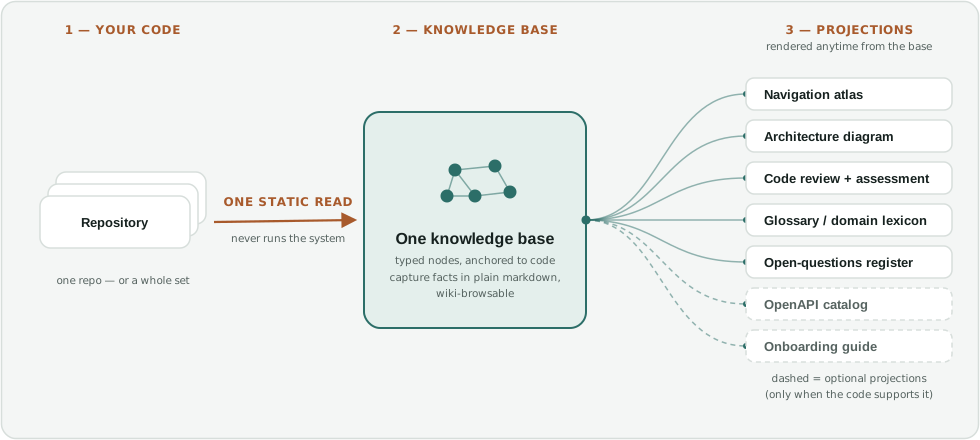
The core idea is simple: one analysis, one knowledge base, many projections. You have the agent read the codebase once into a structured set of facts; after that, every document you need is simply a view over those facts, for a particular aspect of the code and a particular question.
The key is to differentiate capture vs. render: capturing the facts means reading the code; rendering a document just draws on what you've already captured. Reading is the expensive part, so you pay it once - and every document you need afterward is nearly free.
The Process: Static Analysis of Code
The approach is simple: a repeatable process that you can hand over to a capable coding agent, not a tool you install. To be clear, what we're talking about is static analysis of the source code; it never runs the system. (You can create a separate process for dynamic analysis of the running code, but that is a topic for another day.)
This process, described in a codebase analysis playbook, instructs the agent to read and analyze the source code, its configuration, dependencies, deployment artifacts and in-repo docs. The output is a plain-markdown knowledge base you can browse like a wiki, plus whatever documents you choose to project from it. As a bonus, this wiki is valuable on its own terms: it is a knowledge base that can be used directly as an Obsidian vault for reviewing information about the codebase.
This is how the project structure is set up in the codebase analysis playbook:
- Get the lay of the land: figure out the repos, languages, frameworks, and build/test tooling.
- Choose scope: navigation, review, or both. This impacts how the agent reads, not just what it creates.
- Structural pass: walk the system top-down, capturing structure, relationships, and the why, without copying the code itself.
- Review pass: read adversarially and record findings; have independent agents try to refute the important ones before confirming them.
- Render and verify: project the documents, check every claim against the code, and pin a baseline so that the next release is a cheap diff instead of a re-read of the entire codebase.
The Output: A Map, A Diagram and An Assessment
Once the analysis is complete, the agent can generate a variety of outputs that are meaningful to software developers and architects:
- Navigation atlas: where in the code does feature X live?
- Architecture diagram: how does the whole thing fit together? What are the major building blocks and data flows?
- Code review and assessment: what could be improved, what is risky, what does the overall quality look like?
- Glossary: what does this term mean in the context of this system?
- Open questions: what couldn't be verified and needs a human decision or input?
- OpenAPI catalog and Onboarding guide: optional, generated only if the code makes them derivable statically (e.g. if it follows a standard framework such as FastAPI or Flask).
These are all useful artifacts for the humans working on the project; not least for onboarding a new engineer on this project. Equally important, now that the knowledge base has been created, the agent has a factual basis from which to operate when answering questions, designing new features and implementing code - without the token cost of having to re-read large swathes of code every time.
Of course, code never sits still; it is always changing as new features are added and bugs are fixed. But it is relatively low effort to re-run a delta-update process after every release to keep the knowledge base in sync with the new code by having the agent review individual file diffs and update the relevant content and links.
A few key principles of this approach that are worth noting:
- Code is ground truth; documentation drifts. Verify every claim against the code, never against the existing docs.
- Store only what a search can't already give you: entities, relationships, structure and rationale; never a copy of the code.
- There is a clean separation between static and dynamic analysis. But static analysis can get you a long way on its own.
Try It Yourself
Want to try this out yourself on your own codebase? I've put together a starter version of the two playbooks - static_codebase_analysis and release_delta_update - and would be happy to share those with you. You can hand it directly to your agent, adapt it to your stack and run it on your own repos.
You can find me here on X: @NitinK or drop me a note. My email address is on the About page.